
I used to think I didn’t need a to-do list app.
My system was simple—or at least I thought it was. I’d write assignments on sticky notes, save client deadlines in WhatsApp messages, and keep random reminders in my phone’s Notes app. For a while, it worked… until it didn’t.
One week during university, I completely forgot about a programming assignment because I had written the due date on a piece of paper that somehow disappeared. Around the same time, I also missed a freelance client revision because the notification got buried under dozens of other messages.
That was enough to convince me I needed one place for everything.
Over the past few years, I’ve tried almost every popular task management app—from simple checklist apps to advanced productivity tools. Some were far too complicated, while others were so basic that they became useless after a few weeks.
If you’re a student, freelancer, or someone juggling both, here’s my honest experience with the best to-do list apps you can use in 2026.
What Makes a Great To-Do List App?
After trying different apps, I realized that the best task manager isn’t the one with the most features.
It’s the one you’ll actually open every day.
For me, a good to-do list app should have:
- Quick task creation
- Easy reminders
- Cross-device syncing
- Clean interface
- Reliable notifications
- Optional collaboration
- Free version that’s actually useful
Let’s look at the apps that stood out.
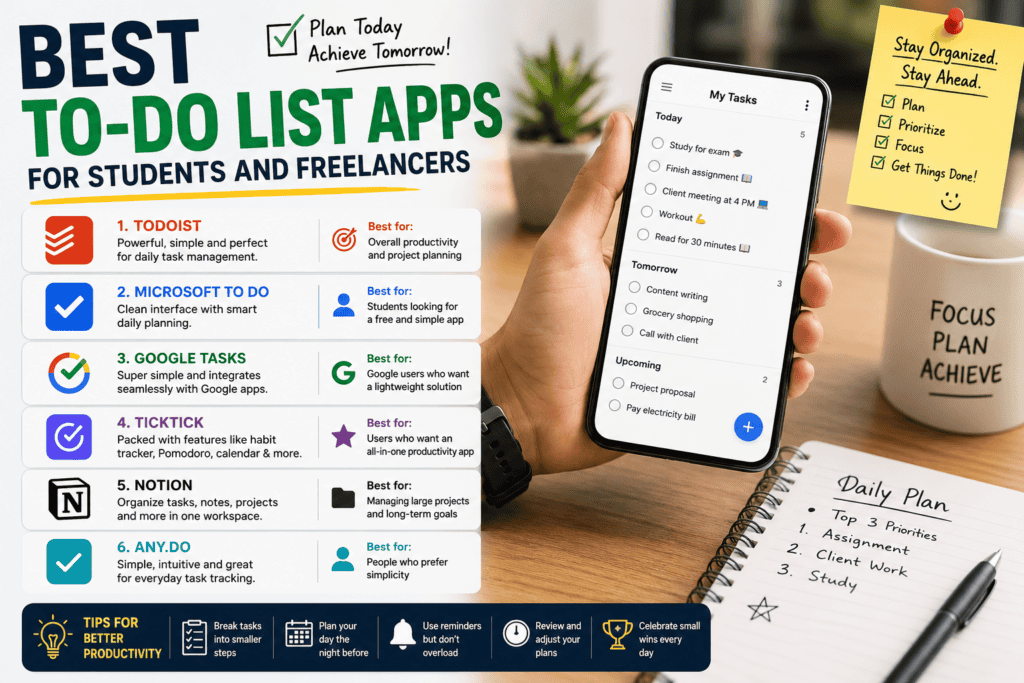
1. Todoist – Best Overall for Students and Freelancers
After months of testing, Todoist became the app I kept coming back to.
It strikes a perfect balance between simplicity and powerful features.
Instead of overwhelming you with dozens of menus, everything feels straightforward.
What I liked
- Add tasks in seconds
- Natural language scheduling (“Tomorrow at 6 PM”)
- Recurring reminders
- Projects and sections
- Priority levels
- Works on Windows, Mac, Android, iPhone, and the web
One feature I use constantly is recurring tasks.
Instead of creating “Study Algorithms” every day, I simply make it repeat Monday through Friday.
After setting it once, I never have to think about it again.
Best for
- University students
- Remote freelancers
- Daily productivity
- Managing multiple projects
2. Microsoft To Do – Best Free Option
If you already use Windows or Microsoft 365, this app feels like a natural extension.
What surprised me was how polished it has become.
It isn’t overloaded with advanced productivity features, which actually makes it easier to stick with.
Highlights
- Completely free
- My Day planning feature
- Syncs across devices
- Shared task lists
- Simple interface
I especially liked using “My Day.”
Each morning I’d choose only today’s tasks instead of staring at a huge list of unfinished work.
That simple change made my workload feel much less stressful.
Best for
Students who want something simple without paying for premium plans.
3. Google Tasks – Perfect for Google Users
If your life already revolves around Gmail and Google Calendar, Google Tasks fits in naturally.
It’s probably the easiest app on this list.
No complicated setup.
No learning curve.
Just open Gmail or Calendar and start adding tasks.
Pros
- Completely free
- Integrated with Gmail
- Works inside Google Calendar
- Fast and lightweight
The downside?
It lacks many advanced organization features.
For basic reminders, though, it’s excellent.
4. TickTick – Feature-Rich Without Feeling Complicated
TickTick surprised me.
I downloaded it expecting another Todoist clone.
Instead, I found one of the most complete productivity apps available.
Besides task management, it includes:
- Habit tracker
- Calendar
- Pomodoro timer
- Notes
- Lists
- Smart reminders
During exam week, I actually used the built-in Pomodoro timer while studying.
Having everything in one place reduced distractions because I didn’t have to switch between different apps.
Best for
People who want an all-in-one productivity system.
5. Notion – Best for Planning Large Projects
Notion isn’t a traditional to-do app.
It’s more like building your own workspace.
That’s both its biggest strength and biggest weakness.
I personally use Notion for:
- Semester planning
- Freelance projects
- Content calendars
- Long-term goals
- Research notes
Instead of just checking off tasks, I can organize everything into databases and dashboards.
The downside is that setup takes time.
If you simply want to remember “Buy groceries,” Notion is probably overkill.
6. Any.do – Best for Simplicity
Sometimes less really is more.
Any.do focuses on keeping your task list clean and easy to manage.
Features include:
- Daily planner
- Calendar integration
- Voice task creation
- Reminders
- Grocery lists
It’s a great option for people who don’t enjoy complicated productivity systems.
Real-Life Example: How I Organize My Week
Here’s the setup that finally worked for me.
University
- Lecture reminders
- Assignment deadlines
- Exam preparation
- Weekly revision schedule
Freelance Work
- Client revisions
- Content writing
- Invoice reminders
- Meeting schedules
Personal
- Exercise
- Reading
- Bills
- Shopping
Keeping everything inside one trusted system reduced mental clutter more than I expected.
How to Choose the Right App
Instead of asking,
“Which app is the most powerful?”
Ask,
“What kind of person am I?”
If you’re always in Google apps
Choose Google Tasks.
If you want the best overall balance
Choose Todoist.
If you love organizing everything
Choose Notion.
If you need advanced productivity tools
Choose TickTick.
If you prefer simplicity
Choose Microsoft To Do or Any.do.
Tips That Actually Improved My Productivity
The app alone won’t make you productive.
These habits mattered much more.
1. Write tasks immediately
Don’t trust your memory.
If something takes less than 10 seconds to record, add it instantly.
2. Break large tasks into smaller ones
Instead of:
“Finish project”
Write:
- Research topic
- Create outline
- Write introduction
- Add references
- Proofread
Small tasks feel much less overwhelming.
3. Plan tomorrow before sleeping
Every night, I spend about five minutes choosing tomorrow’s priorities.
The next morning, I already know exactly where to start.
4. Don’t overload today’s list
This was my biggest mistake.
I used to schedule 20 tasks every day.
Reality?
I’d complete eight.
Now I focus on three important tasks first.
Anything extra is a bonus.
5. Review your completed tasks
Seeing everything you’ve finished is surprisingly motivating.
It reminds you that progress is happening—even if it feels slow.
Common Mistakes People Make
After trying different productivity systems, I noticed these patterns.
Using too many apps
Tasks in Google Keep.
Notes in Notion.
Deadlines in WhatsApp.
Calendar on paper.
Eventually, something gets forgotten.
Chasing the “perfect system”
I wasted hours customizing productivity dashboards instead of actually doing my work.
Simple usually wins.
Ignoring notifications
A reminder only works if you don’t immediately swipe it away.
Creating unrealistic schedules
Planning twelve hours of focused work every day sounds impressive.
Actually doing it is another story.
Be realistic.
Which App Do I Personally Recommend?
If someone asked me today,
“I only want one recommendation.”
I’d say Todoist.
It has the best mix of simplicity, reliability, and powerful features without becoming overwhelming.
But that doesn’t mean it’s the best choice for everyone.
If you’re already using Google services every day, Google Tasks may fit your workflow better.
If you’re managing multiple clients, content calendars, and long-term projects, Notion could be worth the extra setup time.
The best productivity app isn’t necessarily the one with the longest feature list.
It’s the one that quietly becomes part of your daily routine.
Final Thoughts
After years of switching between different productivity apps, I learned something unexpected.
Missing deadlines usually wasn’t the app’s fault.
It was my habit of trying to remember everything instead of writing it down.
Once I committed to using one trusted system consistently, I stopped worrying about forgetting assignments, client work, and everyday responsibilities.
Whether you’re balancing university classes, freelance projects, or both, a reliable to-do list app can reduce stress and help you stay organized without making productivity feel like another full-time job.
Pick one app, spend a few days getting comfortable with it, and stick with it. You’ll likely accomplish far more than if you keep searching for the “perfect” productivity tool.
References
- Todoist Official Website: https://todoist.com/
- Microsoft To Do: https://to-do.microsoft.com/
- Google Tasks Help Center: https://support.google.com/tasks/
- TickTick Official Website: https://ticktick.com/
- Notion Official Website: https://www.notion.so/
- Any.do Official Website: https://www.any.do/