
A few years ago, my daily routine looked pretty ordinary. I’d open my laptop in the morning, check my calendar, create a to-do list, answer emails one by one, and spend half the day organizing work before I actually started doing it.
Then I began experimenting with AI-powered productivity apps.
At first, I only used AI to rewrite a few emails. Later, I started asking it to summarize meeting notes, organize my tasks, brainstorm ideas, and even plan my weekly schedule.
What surprised me wasn’t that AI could do these things—it was how much time I had been wasting on repetitive work without realizing it.
Today, AI has quietly become part of almost every productivity app we use. Whether you’re a student, freelancer, remote worker, or business owner, chances are you’re already using AI without even noticing.
After spending months testing AI features across different apps, I’ve learned that AI isn’t replacing productivity tools—it’s making them much smarter.
Here’s how AI is changing the way we work and what that actually means for everyday users.
Productivity Apps Have Changed More Than We Realize
Not long ago, productivity apps were basically digital notebooks.
You created your own lists.
You organized your own calendar.
You wrote every meeting note.
You searched for every file manually.
Today’s apps work differently.
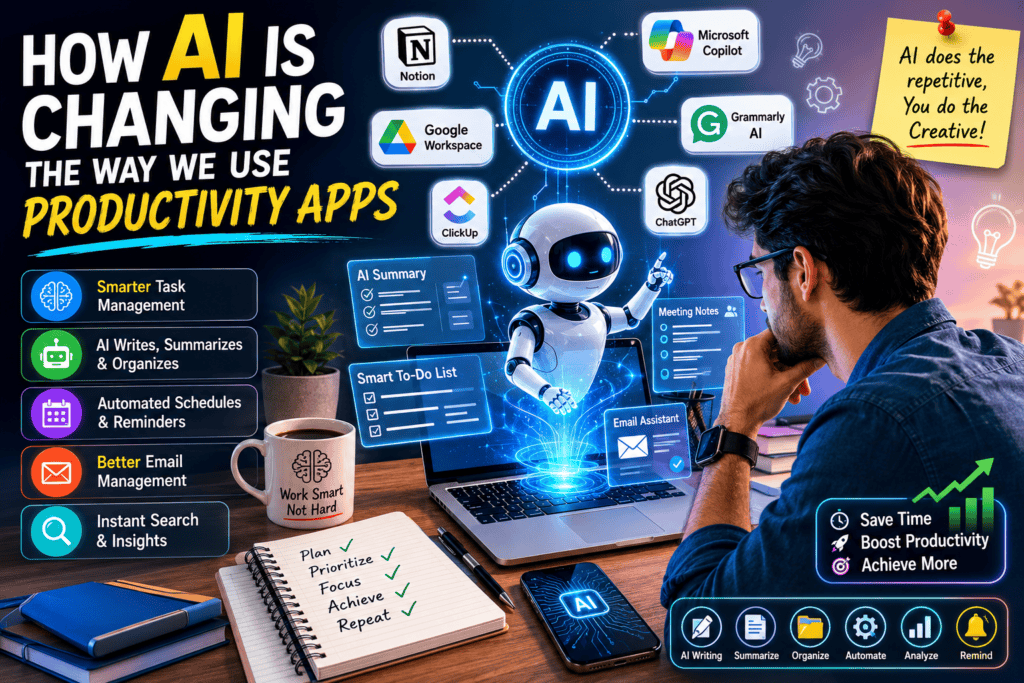
Instead of waiting for instructions, many AI-powered tools now suggest, organize, summarize, and automate tasks for you.
It’s less about storing information and more about helping you use it.
That shift has made a much bigger difference than I expected.
AI Writes Instead of Just Correcting
One of the biggest changes I’ve noticed is in writing.
Previously, productivity apps only checked spelling or grammar.
Now AI can:
- Draft emails
- Rewrite awkward sentences
- Summarize long documents
- Generate reports
- Brainstorm ideas
- Create meeting agendas
I recently had to reply to a client after missing a deadline.
Instead of staring at a blank screen for ten minutes, I asked an AI writing assistant to draft a professional response.
I still edited it to match my tone, but it saved a surprising amount of time.
The important thing is that AI gives you a starting point—not the finished product.
Smarter Task Management
Traditional to-do apps only stored tasks.
AI-powered task managers go much further.
Some can now:
- Prioritize urgent work
- Suggest deadlines
- Recommend the best time to focus
- Group similar tasks together
- Predict scheduling conflicts
When I tested these features, I realized something interesting.
Instead of asking,
“What should I do today?”
The app was already suggesting my most important priorities.
It felt less like managing tasks and more like having a personal assistant.
AI Makes Meeting Notes Almost Effortless
Meeting notes used to be one of my least favorite jobs.
I would either:
- Miss important points while typing
- Or spend another hour writing summaries afterward.
Now many productivity tools can:
- Record meetings
- Generate transcripts
- Create summaries
- Highlight action items
- Assign follow-up tasks
Even if you don’t use every feature, having an organized summary ready within minutes feels like a huge improvement.
Searching for Information Is Much Easier
One feature I didn’t expect to use so often is AI-powered search.
Instead of remembering exactly where I saved something, I can ask questions like:
“Show me the project notes from last month.”
Or:
“Find the meeting where we discussed the marketing budget.”
The app understands the request without needing the exact file name.
When you’re juggling dozens of documents, this becomes incredibly useful.
AI Helps Students Study Smarter
As a university student, this is probably where I noticed the biggest difference.
Instead of reading the same chapter three times, AI tools can help:
- Summarize lecture notes
- Explain difficult concepts
- Create flashcards
- Generate quizzes
- Organize research
- Build study schedules
During exam season, I started using AI to turn lengthy notes into simple summaries before revision.
It didn’t replace studying—it simply made reviewing faster.
Of course, I always double-check the information because AI isn’t perfect.
Freelancers Save Time on Repetitive Work
Freelancing involves much more than client work.
There’s also:
- Sending invoices
- Writing proposals
- Scheduling meetings
- Organizing projects
- Following up with clients
AI now assists with many of these repetitive tasks.
For example, some project management tools automatically generate project updates based on completed work.
That means less administrative work and more time for actual client projects.
AI Can Organize Your Calendar
One feature I initially ignored turned out to be surprisingly helpful.
AI scheduling assistants.
Instead of manually moving meetings around, some apps now suggest the best available time based on:
- Existing appointments
- Deadlines
- Focus hours
- Team availability
This doesn’t sound revolutionary until you’ve spent twenty minutes trying to coordinate schedules with several people.
Better Email Management
Most professionals receive dozens of emails every day.
AI helps by:
- Writing replies
- Summarizing long email threads
- Prioritizing important messages
- Suggesting quick responses
- Detecting follow-up reminders
I still read important emails myself, but AI helps me spend less time sorting through everything else.
Popular Productivity Apps Using AI
Here are some well-known apps that have introduced useful AI features.
Notion AI
Great for:
- Writing
- Summarizing notes
- Brainstorming
- Organizing knowledge
Microsoft Copilot
Integrated with Microsoft 365 for:
- Word
- Excel
- Outlook
- Teams
It can summarize meetings, draft documents, and analyze spreadsheets.
Google Workspace AI
Available across Google Docs, Gmail, Sheets, and other Workspace tools.
Helpful for:
- Drafting emails
- Summarizing documents
- Creating content
- Organizing information
ClickUp AI
Designed for project management.
Useful for:
- Task creation
- Documentation
- Project summaries
- Workflow automation
Grammarly AI
No longer just a grammar checker.
It now helps rewrite paragraphs, adjust tone, and improve clarity.
Common Mistakes People Make With AI
After experimenting with these tools, I noticed several mistakes that are easy to make.
Copying everything without reviewing
AI makes mistakes.
Always proofread important emails, assignments, or reports before sending them.
Depending on AI for every decision
AI should assist your thinking—not replace it.
Critical decisions still need human judgment.
Using AI without learning the basics
Students sometimes ask AI to solve everything.
Understanding the underlying concepts is still important, especially in education.
Ignoring privacy settings
Some AI tools process uploaded documents.
Avoid uploading sensitive personal or confidential information unless you understand the platform’s privacy policies.
Tips for Using AI Productively
Here are a few habits that genuinely improved my workflow.
- Use AI for repetitive tasks, not creative thinking.
- Review AI-generated content before publishing.
- Learn how to write clear prompts.
- Keep your own writing style instead of copying everything.
- Use AI to save time, then invest that time in meaningful work.
That’s where the real productivity gains happen.
Will AI Replace Productivity Apps?
I don’t think so.
Instead, productivity apps are becoming AI-powered assistants.
Calendars still exist.
Task managers still exist.
Note-taking apps still exist.
They’re simply becoming smarter.
The goal isn’t to replace users.
It’s to reduce repetitive work so people can focus on tasks that actually require creativity, decision-making, and problem-solving.
Final Thoughts
The biggest lesson I’ve learned from using AI-powered productivity tools is that they don’t magically make you productive.
Good habits still matter.
Planning still matters.
Time management still matters.
What AI does exceptionally well is remove small, repetitive tasks that quietly consume hours every week.
Whether it’s drafting an email, organizing meeting notes, creating summaries, or planning your schedule, AI gives you more time to focus on work that actually moves you forward.
If you haven’t tried AI features inside your favorite productivity app yet, start with one simple task.
You might be surprised by how quickly it becomes part of your daily routine—not because it’s trendy, but because it genuinely makes everyday work a little easier.
References
- OpenAI – ChatGPT: https://openai.com/chatgpt
- Google Workspace AI: https://workspace.google.com/
- Microsoft Copilot: https://www.microsoft.com/copilot
- Notion AI: https://www.notion.so/product/ai
- ClickUp AI: https://clickup.com/ai
- Grammarly AI: https://www.grammarly.com/ai
- McKinsey & Company – The Economic Potential of Generative AI: https://www.mckinsey.com/capabilities/quantumblack/our-insights/the-economic-potential-of-generative-ai-the-next-productivity-frontier