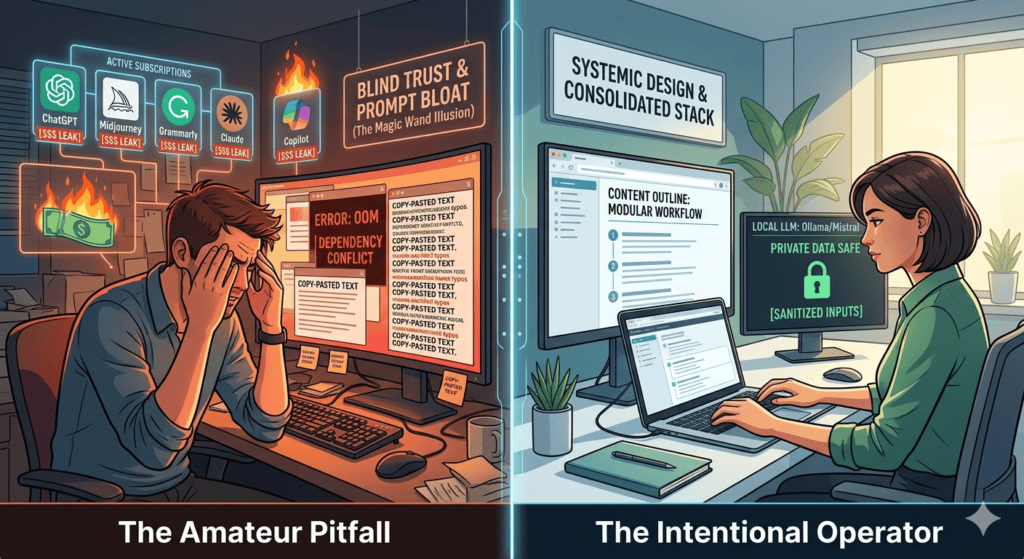

We have all been there. You sign up for a cutting-edge AI tool, type a quick sentence into the prompt box, and watch the magic happen. For the first few days, it feels like you have a superpower. You are churning out lines of code, drafting articles, and generating images at a speed that feels almost unfair.
But then, the novelty wears off, and reality hits.
A few months ago, I was helping a friend audit a new digital project they had built almost entirely using automated setups. On paper, they had moved incredibly fast. In reality, their database configurations were an unoptimized mess, the content on their site sounded hollow and mechanical, and they were burning through hundreds of dollars in cloud API subscriptions for automations that could have been handled with a simple five-line script.
They had fallen face-first into the classic traps of the early adoption phase.
In 2026, AI tools have become deeply woven into our daily workflows. However, the barrier to entry is so low that it is incredibly easy for beginners to develop bad habits that actually slow down their professional growth, ruin their output quality, and cost them serious money.
Let’s pull back the curtain on the five most common mistakes beginners make when diving into the world of AI—and exactly how you can avoid them to build a highly efficient, sustainable workflow.
1. The “Magic Wand” Illusion (Treating AI as a Creator, Not an Editor)
The absolute biggest mistake beginners make is treating an AI tool like a magical entity that does the final work for them. They type a broad, single-line prompt like “Write a 1200-word article about web hosting” or “Build me a calculator app,” copy the exact output without looking at it, and hit publish.
[ Broad, Lazy Prompt ] ──► AI Spits Out Generic Code/Text ──► Blindly Published ──► Subpar Results
Why this fails:
AI models are trained on massive public datasets to predict the most statistically probable next word or line of code. If you give them a generic, low-effort prompt, they will give you a generic, low-effort response. It will lack deep personal insight, structural nuance, and real-world authenticity. If you are a digital publisher, relying on raw, unedited AI content is the fastest way to kill your site’s user engagement and risk ad revenue policy violations.
The Real-World Fix:
Shift your perspective. Stop viewing AI as the independent creator and start viewing it as your highly capable intern or research partner.
- Do the heavy lifting first: Provide the structure, the unique angle, the personal experience, and the explicit core arguments.
- Let AI handle the initial formatting: Use it to clean up your rough outlines, generate initial drafts, or suggest structural layouts.
- Always apply the final human layer: Review every sentence, rewrite code functions manually, and ensure the final product carries your unique voice and professional authority.
2. Prompt Bloat vs. Context Engineering (The Wall of Text Trap)
When beginners realize that short prompts give generic answers, they often swing completely to the opposite extreme. They start writing massive, multi-page prompts packed with fifty different rules, historical context, style guidelines, and edge cases, thinking more text equals a better response.
Why this fails:
This leads to a well-known technical phenomenon called attention drift or “lost in the middle.” Large language models prioritize the very beginning and the very end of a prompt window. If you bury a critical operational rule right in the middle of a massive 800-word block of text, the model is highly likely to ignore it entirely during execution.
How to structure your tasks instead:
Instead of overloading a single chat session, use a modular, step-by-step workflow. Break your massive goal down into a sequence of smaller, tightly focused prompts.
1.Establish the Structural Skeleton:Focus on structural alignment.
Provide the raw data or topic and ask the AI to generate only a comprehensive outline or architectural plan first. Review it and make manual adjustments.
2.Execute Content Modularly:Work section by section.
Feed the approved outline back to the model section by section. Say: “Now, look only at Section 1. Draft the technical implementation details for this specific step using a conversational tone.”
3.Apply Style and Code Refinement Later:Isolate formatting from creation.
Once the raw substance is complete, run a final standalone prompt dedicated purely to polishing. For example: “Review this complete draft for unnecessary jargon and ensure all code blocks conform to standard formatting.”
3. The “Vibe Coding” Dependency (Losing Your Foundational Problem-Solving Skills)
With the rise of highly advanced coding environments like Cursor or autonomous terminal agents, it has become incredibly easy for non-developers to spin up functional applications entirely through chat. Beginners often fall into “vibe coding”—letting the AI write, edit, and link multiple files across a directory while they just watch the terminal run.
Why this fails:
The moment the application throws a complex network error, or an underlying framework API updates, the beginner hits a complete wall. Because they didn’t write or rationalize the logic line-by-line, they have no idea how data flows through their system. They become entirely dependent on the tool to fix its own bugs, leading to a frustrating loop of copy-pasting error codes back and forth without making actual progress.
The Sustainable Approach:
Use AI as a highly patient senior developer sitting next to you, not a ghostwriter.
- If an assistant suggests a block of code or an advanced script, do not blindly hit accept.
- Copy the block, paste it into an explanation window, and ask: “What does this specific loop do conceptually, and what happens to our data if this variable returns null?”
- Force yourself to manually type out key sections to build physical muscle memory for syntax, logical structures, and troubleshooting.
4. Subscribing to Multiple Overlapping Tool Chains (The Financial Leak)
It is incredibly easy to fall victim to subscription fatigue. A beginner will pay $20/month for a premium conversational chatbot, another $20/month for a specialized AI writing assistant, $15/month for a dedicated image generator, and another $10/month for a coding companion plugin. Before they know it, they are bleeding $65+ every single month for highly redundant features.
Why this fails:
Most consumer-facing AI applications are built on top of the exact same underlying foundational models (like GPT-4o, Claude 3.5 Sonnet, or Llama models) accessed via developer APIs. When you pay for three different text-based apps, you are often paying a massive premium for a slightly different user interface wrapped around the exact same engineering engine.
The Strategic Fix:
Audit your tech stack ruthlessly and look for multi-modal consolidation.
| If your primary daily task is… | Skip paying for… | And instead maximize… |
| Writing articles, brainstorming ideas, and basic graphic creation. | Standalone niche writing assistants and separate stock image platforms. | A single, comprehensive workspace subscription like ChatGPT Plus or Google One AI Premium, which handles advanced text, canvas editing, and image generation in one place. |
| Building web projects, modifying codebases, and technical debugging. | General chat windows where you have to constantly copy-paste files. | An AI-native code editor like Cursor or Windsurf, which gives you deep repository context and inline editing within a single subscription. |
5. Overlooking Data Privacy and Secure Token Stewardship
When you are deeply focused on solving a technical problem or formatting a complex business spreadsheet, it is easy to forget that public AI interfaces are designed to learn from your inputs. Beginners frequently copy and paste raw database configuration files, live API access tokens, proprietary business strategies, or sensitive personal data straight into standard chat windows.
[ Paste Config File with Live Passwords ] ──► Public Cloud Storage ──► Risk of Exposure / Training Data Leak
Why this fails:
By default, most standard consumer tiers use your chat history to continuously train and refine future iterations of their public models. If you paste a live configuration file containing server passwords or proprietary client data, that information is uploaded to external servers and could theoretically compromise your security boundaries down the line.
The Secure Habits to Build:
- Sanitize your data inputs: Before pasting any code snippet or error log into an AI assistant, manually scrub out live passwords, actual API keys, server IP addresses, and private names. Use placeholder variables like
YOUR_DATABASE_PASSWORDorexample_domain.com. - Utilize local alternatives: For highly sensitive project notes or proprietary documentation, look into running open-weight small language models (like Llama-3 or Mistral) locally on your hardware using tools like Ollama combined with an offline markdown editor like Obsidian. What happens on your hard drive stays entirely under your control.
Final Thoughts: Becoming a High-Leverage Operator
The ultimate goal of incorporating AI into your professional life isn’t about saving yourself from the hard work of thinking. It is about eliminating the friction of repetitive manual execution so you can dedicate your time to higher-level strategy, creative problem-solving, and systemic design choices.
If you have fallen into any of these common traps over the last few months, don’t sweat it—it is a completely natural part of adapting to a paradigm shift in technology.
Pick just one bad habit to eliminate this week. Start sanitizing your code inputs, force yourself to write a step-by-step modular prompt chain, or cancel a redundant subscription you barely use. Transition away from being a passive consumer who blindly trusts a chat window, and become a deliberate, high-leverage operator who runs their digital toolkit with absolute clarity.