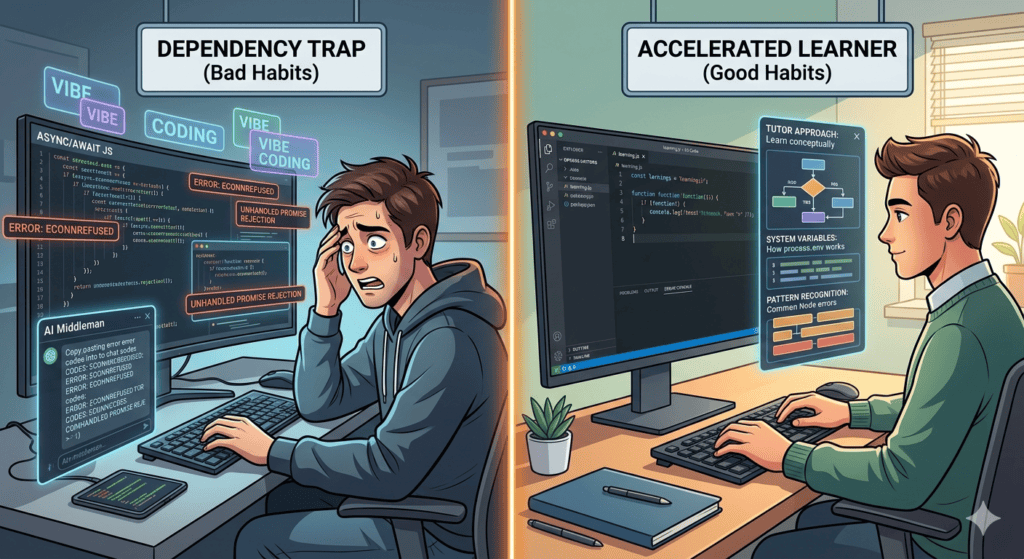

If you stroll through tech forums or developer subreddits right now in 2026, you’ll hit a wall of extreme opinions about learning to program. On one side, you have the purists arguing that using AI to learn code is like using a calculator to learn basic arithmetic—you’ll never actually understand the fundamentals. On the other side, enthusiasts claim traditional syntax memorization is dead, and we are all just “vibe coding” our way to finished applications now.
I remember exactly where I stood on this when AI coding tools first started blowing up. I tried to build a small web application using a stack I wasn’t entirely familiar with, and instead of writing it line-by-line, I let an inline assistant vomit out seventy lines of complex asynchronous JavaScript. It looked beautiful. It looked professional.
Then, I hit run.
The terminal exploded with nested configuration errors. Because I had let the AI do all the driving without understanding a single line of the logic, I spent the next four hours copy-pasting error messages back and forth like a clueless middleman. I hadn’t saved any time; I had just automated my own confusion.
That was my first major lesson in the era of AI-assisted engineering. In 2026, the question is no longer whether these tools are powerful enough—tools like Cursor, GitHub Copilot, and Claude Code can refactor entire directories autonomously. The real question is: Are they actually helping you learn, or are they keeping you trapped as a beginner?
Let’s cut through the marketing hype and lay out how you can actually leverage these tools to build real programming skills without killing your ability to solve problems independently.
The Landscape: Autocomplete vs. Full AI IDEs vs. Terminal Agents
To use these tools effectively as a beginner, you have to realize that they aren’t all built for the same job. The tool ecosystem has matured into three very distinct categories.
       [ Line-by-Line Help ] ───► GitHub Copilot (Inline Extensions)
                 │
                 ├───► [ Full Workspace Control ] ───► Cursor / Windsurf
                 │
                 └───► [ Autonomous Execution ] ───► Claude Code / Terminal Agents
1. The Inline Autocomplete (The Smart Co-Writer)
Tools like GitHub Copilot live inside your traditional editor (like VS Code). They watch your cursor and predict the next line or block of code based on patterns. They are the least intrusive and behave like a hyper-advanced version of your smartphone’s auto-correct.
2. The AI-Native IDE (The Visual Partner)
Platforms like Cursor or Windsurf aren’t just plugins—they are entire code editors built from scratch around AI. Features like Cursor’s Composer allow you to use natural language to edit multiple files across your workspace simultaneously.
3. The Terminal Agent (The Autonomous Worker)
Tools like Anthropic’s Claude Code live completely inside your command-line interface (CLI). You give them a broad task, and they will search your repository, write code, run terminal test suites, debug their own errors, and commit the final patch to GitHub entirely on their own.
The Beginner’s Trap: “The Middleman Syndrome”
For a total beginner, jumping straight into an autonomous terminal agent or a multi-file generator is the fastest way to stunt your growth.
When you say, “Build me a login page with database authentication,” and the AI instantly generates four different files, handles the encryption logic, and configures the environment variables, you haven’t learned how to code. You’ve learned how to follow instructions.
The moment the AI generates an unhandled edge case or an API changes, your entire project breaks, and you won’t have the foundational pattern recognition needed to look at the stack trace and pinpoint the flaw. You become completely dependent on the tool to fix what it created.
The Winning Stack: How to Setup Your Environment for Learning
If you want to actually build a career or a deep skill set, you need to use AI as a tutor, not a ghostwriter. Here is the exact setup and workflow I recommend for anyone starting out.
1.Choose a Traditional Editor with Inline Assistance:Tool: VS Code + GitHub Copilot ($10/mo or Free for Students).
Do not start with an autonomous agent. Use a standard editor with simple tab-completion. Let the AI suggest minor syntax blocks, but force yourself to read and rationalize every single line before hitting tab. If you are a student, apply with your school email to get this stack completely free.
2.Keep an Explanation Window Open:Tool: Claude Free Tier / ChatGPT.
Whenever an assistant suggests a block of code you don’t fully understand, do not commit it. Copy that block, drop it into a chat window, and use the rule of absolute curiosity: “Explain exactly what this specific loop is doing, why this parameter is necessary, and what happens if this variable returns null.”
3.Enforce the ‘Write-Over’ Rule:Method: Physical Muscle Memory.
Instead of letting the AI auto-paste hundreds of lines into your file, look at the suggestion on screen or in your chat box, and manually type it out yourself. This sounds tedious, but building physical muscle memory for syntax, brackets, and indentations is what transitions you from reading code to thinking in code.
4.Configure Rigid Rules Files:Method: Using .cursorrules or System Prompts.
If you do decide to use an AI-native editor like Cursor, create a file named .cursorrules in your project root. Explicitly instruct the model: “Do not write the entire solution for me. Provide pseudo-code, point out structural flaws in my current logic, and explain the architectural concepts step-by-step so I can implement them.”
A Real-World Scenario: Debugging a Connection Error
Let’s look at how the wrong approach vs. the right approach plays out when your application crashes. Imagine you are building a simple Node.js application, and your backend server fails to connect to your local database, throwing a vague ECONNREFUSED error.
                    [ The Project Crashes: ECONNREFUSED ]
                                      │
             ┌────────────────────────┴────────────────────────┐
             ▼                                                 ▼
     [ The Wrong Approach ]                            [ The Right Approach ]
• Copy-paste error blindly into AI.               • Ask AI: "What does ECONNREFUSED
• Let AI rewrite config files completely.          mean conceptually in network ports?"
• App runs, but you have no idea why              • Manually verify if your database
  or what configuration changed.                    service is actively running locally.
                                                  • Modify port flags yourself based
                                                    on systemic understanding.
If you take the lazy route, you might copy the entire error block, paste it into an AI tool, and accept whatever massive code patch it spits back out. The error might disappear, but you’ve missed a critical lesson on port allocations, environment variables, or local service states.
If you take the learning-first route, you treat the AI like a senior developer sitting next to you. You ask: “What are the most common system reasons a Node app throws an ECONNREFUSED error when targeting a local database?” The AI will explain that either the database service isn’t actively running on your machine, or your app is knocking on the wrong network port. You check your local services, modify the port flag yourself, and walk away with a permanent addition to your mental troubleshooting library.
Summary Checklist: Are You Using AI Correctly?
| 🚫 The Dependency Trap (Bad Habits) | ✅ The Accelerated Learner (Good Habits) |
| Copying and pasting large blocks of error logs without reading them. | Asking the AI to explain the underlying system concept behind an error message. |
| Letting an agent generate multiple files at once before writing a single line yourself. | Breaking your project down into tiny sub-functions and writing them manually. |
| Measuring progress by how many features you “shipped” today. | Measuring progress by how much of your own codebase you can explain to someone else. |
| Using AI to avoid doing hard, frustrating logical thinking. | Using AI to clarify confusing official language inside documentation files. |
The Verdict on 2026 Code Assistants
Are AI coding assistants worth using for beginners in 2026? Absolutely, but only if you use them to optimize your understanding, not your output speed.
If you approach these tools as a magic wand that saves you from having to learn how loops, memory structures, and API logic function under the hood, you will remain an permanent beginner. You will quickly find yourself outpaced by developers who possess true structural comprehension.
But if you treat AI as an infinitely patient, 24/7 personal tutor that can break down complex documentation, explain obscure syntax, and guide you through logical roadblocks step-by-step, it is the single greatest learning accelerator ever invented. Use the assistants to demystify the tech stack, keep your hands on the keyboard, and never let the machine do the thinking for you.